One sound. Every speaker.
Multi-output audio for Windows.
Play system audio through multiple Bluetooth earbuds, headphones, and speakers at once — with per-device sync delay and zero virtual drivers.
Native Windows 11 Fluent Interface
Clean, dark-mode native desktop experience built with .NET 9 and Windows Presentation Foundation (WPF). No bloat, no ads, and no confusing menus.
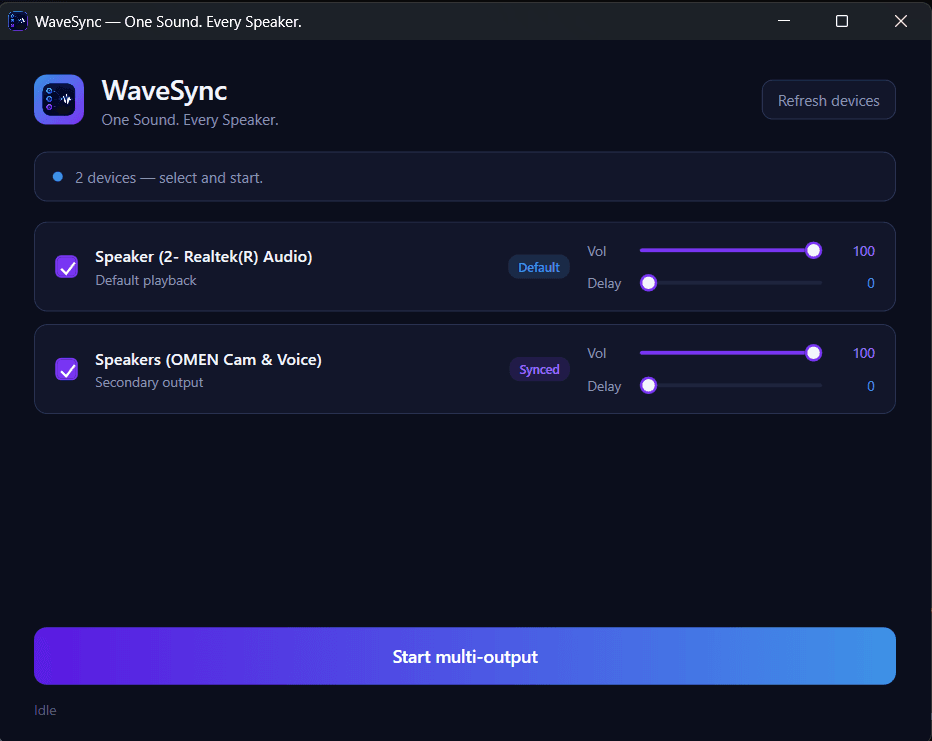
Windows system sound routes natively to your primary speaker with 0ms direct loopback.
Simultaneously duplicates sound to secondary Bluetooth, USB, or external devices.
Independent 0–100% volume and millisecond latency sliders to cancel Bluetooth echo.
Simple Start/Stop button powered by the high-performance C++20 WASAPI loopback engine.
Everything Windows Audio Was Missing
WaveSync is architected in modern C++20 and .NET 9 to solve the multi-speaker problem that Windows users have endured for decades.
Simultaneous Multi-Device Audio
Play system audio across multiple Bluetooth earbuds, headphones, and laptop/desktop speakers at the exact same time. Share music, watch movies together with two pairs of AirPods or Bluetooth headsets.
- ✓Multiple Bluetooth Earbuds
- ✓USB + 3.5mm + HDMI
- ✓Any Audio Source (Spotify, VLC, YouTube)
Per-Device Sync Delay (0–500ms)
Different Bluetooth models and wireless chipsets carry different hardware decoding latencies. WaveSync features fine-grained millisecond delay sliders to sync every device perfectly with zero echo.
- ✓Sub-millisecond Precision
- ✓Zero Acoustic Drift
- ✓Real-time Live Adjustment
Zero Kernel Drivers Required
No messy virtual audio cables (VAC), no Voicemeeter driver crashes, and no Windows kernel tampering. Powered 100% natively by Windows Core Audio WASAPI Loopback capture.
- ✓No Admin Kernel Installs
- ✓No BSOD Driver Risks
- ✓Clean Uninstallation
System Tray & Background Mode
Lives quietly in the Windows Taskbar Notification Area right next to your clock. Minimizing or clicking the [X] close button keeps your audio streaming smoothly without interruption.
- ✓Instant Tray Minimization
- ✓Right-Click Quick Controls
- ✓Zero UI CPU Draw in Tray
Real-Time Auto-Reconnect
Integrated with Windows COM IMMNotificationClient. Unplugging one set of earbuds doesn't interrupt other speakers; reconnecting earbuds automatically re-engages streaming in milliseconds.
- ✓Dynamic Device Arrival/Removal
- ✓Glitch-Free Failover
- ✓No Manual Re-launch Needed
Anti-Feedback Loop Safeguard
Prevents destructive acoustic feedback and loopback amplification by letting Windows route natively to the default endpoint while duplicating clean secondary streams in lock-free buffers.
- ✓Safe Loopback Ingestion
- ✓No Ring-Modulation Echo
- ✓Bit-Accurate 32-bit Float Audio
WaveSync vs The Competition
Why struggle with complex virtual audio routing or paid donationware when you can have a lightweight, zero-driver native application?
| FEATURE | WaveSync (Recommended) | Windows 10/11 Default | Voicemeeter / VAC | Stereo Mix ("Listen") |
|---|---|---|---|---|
| Dual / Multiple Bluetooth Streaming | Native Support (Any 2+ devices) | ❌ 1 Device Only | ⚠️ Clunky & Complex Setup | ❌ Severe Drift & Lag |
| Driver Requirements | Zero Drivers (Native WASAPI) | Standard Drivers Only | Virtual Kernel Drivers (Reboot needed) | Legacy Sound Card Driver |
| Per-Device Latency Delay Offset | ✅ Yes (0–500ms live sliders) | ❌ No | ⚠️ Hidden in deep menus | ❌ No delay adjustment |
| Per-Device Volume Controls | ✅ Yes (Individual 0–100%) | ❌ Master Volume Only | ✅ Yes | ❌ Combined slider |
| Memory & CPU Overhead | ⚡ Ultra-light (<25MB RAM, <1% CPU) | 0MB | ⚠️ Heavy (100MB+ RAM) | Low, but erratic |
| Hot-Plugging & Reconnect | ✅ Seamless (IMMNotificationClient) | Manual switch required | ❌ Engine restart needed | ❌ Drops audio |
| System Tray Background Running | ✅ Native Fluent Tray Runner | N/A | Cluttered UI footprint | N/A |
| License & Cost | 100% Free & Open-Source (MIT) | Bundled with OS | Donationware / Nag screens | Free (Hardware dependent) |
C++20 Audio Engine & .NET 9 Fluent Architecture
WaveSync is engineered for zero-latency deterministic audio safety. No memory allocations on the audio path, no COM stalls, and lock-free thread synchronization.
Windows System Audio
Spotify, YouTube, Games, Video Calls
Master Audio BusDefault Output Endpoint
Laptop Speakers or Primary Monitor
Untouched System RouteLoopback Capture (C++20)
Bit-perfect 48kHz float32 stereo capture
WaveSyncEngine.dllVolume Scaling (0-100%) → WASAPI Render Client → Noise Buds VS102
Volume Scaling (0-100%) → WASAPI Render Client → Realme Buds Air 3
Volume Scaling (0-100%) → WASAPI Render Client → Bluetooth Soundbar
Lock-Free SPSC Ring Buffers
Capture and render threads operate completely asynchronously. Audio frames are exchanged via single-producer single-consumer ring buffers using atomic indices, guaranteeing zero mutex contention and zero audio crackle under CPU load.
Clean C ABI & P/Invoke Interop
The audio engine compiles to a standalone, zero-dependency native DLL (WaveSyncEngine.dll). A flat C interface bridges high-performance C++ audio routines directly to modern C# and WPF without memory marshalling penalties.
Real-Time Audio Safety Guardrails
Following professional DAW standards, the audio render callbacks perform zero heap allocations (malloc/new), zero disk I/O, and zero COM lock acquisitions. This achieves rock-solid real-time determinism.
COM IMMNotificationClient Hot-Plugging
Real-time hardware monitoring detects the arrival and removal of Bluetooth and USB audio interfaces. If a device disconnects, the pipeline cleans up gracefully without crashing or interrupting active streams.
Installation & Quick Start
No runtime dependencies, no command-line tools required for everyday users. Run the native Windows installer and start streaming immediately.
Windows Setup Wizard
- 01Download the Installer
Grab the official signed installer
WaveSync-Setup-v1.1.1.exe. - 02Select Audio Endpoints
Open WaveSync and check the boxes next to each Bluetooth, USB, or built-in speaker device you wish to broadcast to.
- 03Fine-Tune Sync & Enjoy
Hit Start Multi-Output. Adjust the millisecond delay slider if one pair of earbuds plays slightly behind the other.
- 04Minimize to Tray
Close or minimize the window. WaveSync lives in your system tray and streams system audio silently in the background.
Building from Source
WaveSync is 100% open-source under the permissive MIT License. Prerequisites: Windows 10/11 x64, .NET 9.0 SDK, and CMake 3.25+.
# 1. Clone the repository
git clone https://github.com/Indal-Singh/WaveSync.git
cd WaveSync

# 2. Automated 1-Click Build (compiles C++ DLL & WPF app)
.\scripts\build.ps1

# 3. Launch WaveSync desktop application
.\run.ps1
Common Questions & Answers
Everything you need to know about Windows multi-output audio, latency synchronization, and zero-driver streaming.
How can I play audio through two Bluetooth headphones at the same time on Windows?
On Windows, the operating system only assigns one default playback endpoint at a time. WaveSync solves this natively: simply install WaveSync, open the app, check the boxes for both connected Bluetooth headphones or earbuds, and click 'Start Multi-Output'. WaveSync captures the system audio loopback and broadcasts it simultaneously to both devices in real time.
Why does Windows natively lack a Multi-Output Audio Device like macOS?
macOS includes an 'Aggregate Device' and 'Multi-Output Device' utility built inside its Audio MIDI Setup tool. Windows historically delegated audio routing to hardware driver manufacturers. WaveSync bridges this gap by implementing native Windows WASAPI Loopback capture to provide the exact same multi-output convenience on Windows 10 and 11.
How do I fix the echo or sound delay between different Bluetooth earbuds?
Different Bluetooth earphones (e.g. Sony, Realme, Noise, Apple AirPods) have distinct internal DSP decoding latencies. If one earbud delays by 40ms and the other by 80ms, you hear an unpleasant echo. WaveSync features an exclusive Per-Device Millisecond Sync Delay slider (0–500ms). Simply adjust the slider by a few milliseconds until both earphones hit perfect sync with zero echo.
Does WaveSync require Virtual Audio Cable or Voicemeeter?
No! Unlike Voicemeeter or Virtual Audio Cable (VAC), WaveSync requires zero virtual kernel drivers, zero system reboots, and zero virtual soundcards. It interacts directly with Windows Core Audio APIs in user space, making it lighter (<25MB RAM), safer, and crash-proof.
Does WaveSync run silently in the system tray?
Yes. WaveSync is built with Windows 11 Taskbar notification tray integration. Clicking Minimize or the [X] close button parks WaveSync silently next to your system clock, keeping audio streaming without interruption. You can right-click the tray icon to start, stop, or exit anytime.
Is WaveSync safe, free, and open-source?
Yes. WaveSync is 100% free and open-source under the MIT License on GitHub (github.com/Indal-Singh/WaveSync). The entire C++20 engine and .NET 9 WPF codebase is public, audit-friendly, and has zero telemetry or advertising.
What audio sources work with WaveSync?
Any application that outputs sound on Windows! This includes Spotify, Apple Music, YouTube in Google Chrome or Edge, Netflix, VLC Media Player, video games, Zoom, and Discord.
Transform How You Listen on Windows Today
Download WaveSync and experience true simultaneous multi-output audio across all your Bluetooth, USB, and built-in speakers. Free, lightweight, and open-source forever.